 NestForge
True-shape nesting · offline · one-time purchase
Fit more parts on every sheet, with a layout your machine can trust.
NestForge arranges your SVG and DXF parts on sheets for laser, CNC router and plasma cutting. Every result is checked by an independent, exact-arithmetic validator before you ever see it. It runs entirely in your browser. Your files never leave your machine.
Free tier: up to 10 parts on 1 sheet, no time limit. Test it on your own files before paying a cent.
Prices plus VAT/sales tax depending on your country; the checkout shows the final amount.
Your material is money.
Every sheet you cut has a price tag: Baltic birch, acrylic, mild steel, leather. The gap between a mediocre layout and a tight one isn't cosmetic: it's a percentage of that price tag, on every single job, forever. Nesting software pays for itself in offcuts.
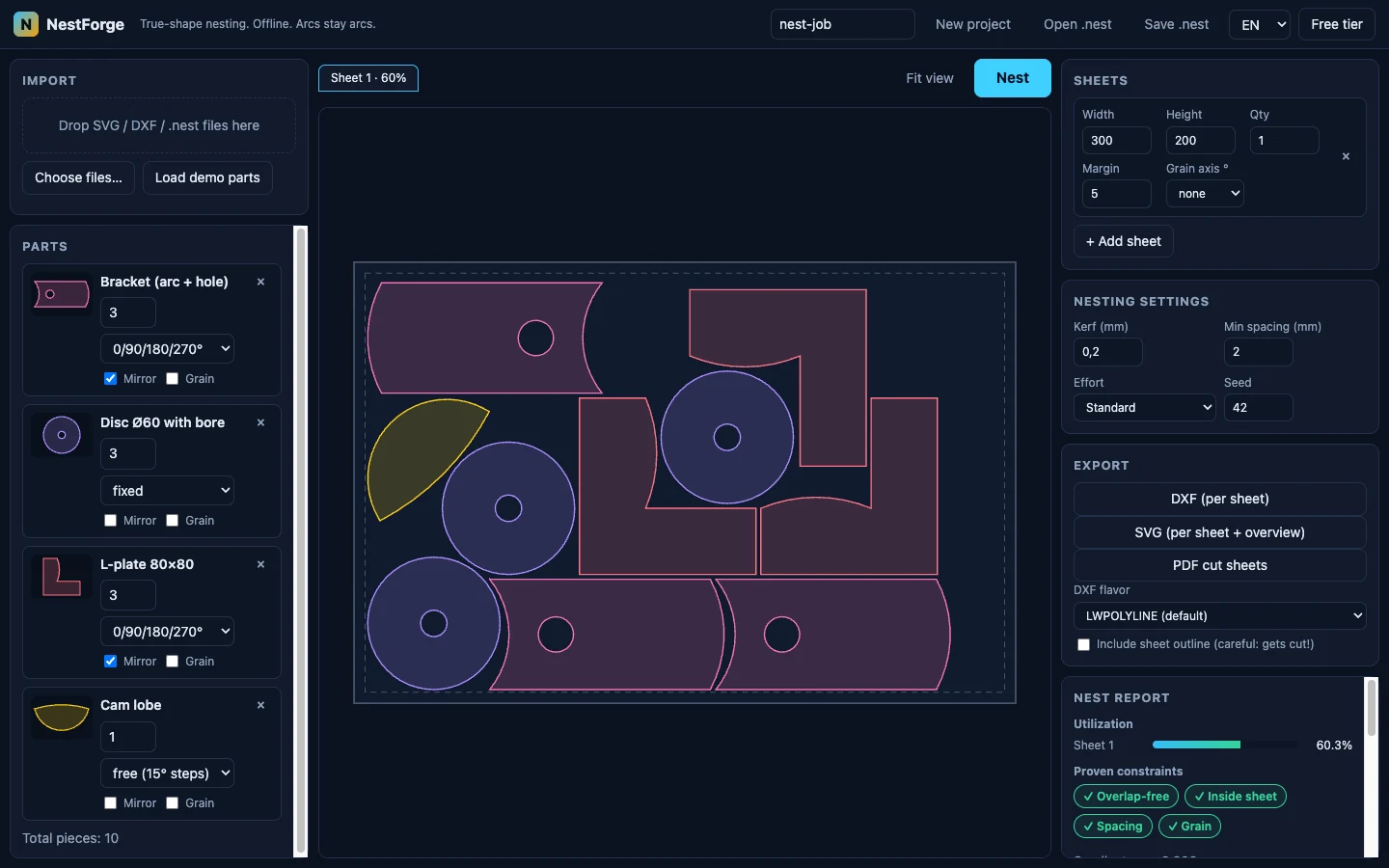
True-shape, not bounding boxes
NestForge nests the actual outlines: concave parts interlock, L-shapes hook into each other, discs tuck into notches. Rectangles around parts waste the material you paid for.
Rotation, mirror & grain
Per part: fixed, 90°-step, 180° or free rotation, optional mirroring, plus a grain constraint for wood, brushed metal or patterned material, enforced per sheet axis.
Multi-sheet with a report
Jobs spill across sheets automatically. The nest report shows utilization per sheet and the exact constraints that were checked, so you know what a layout costs you before you cut.
Even the holes work for you.
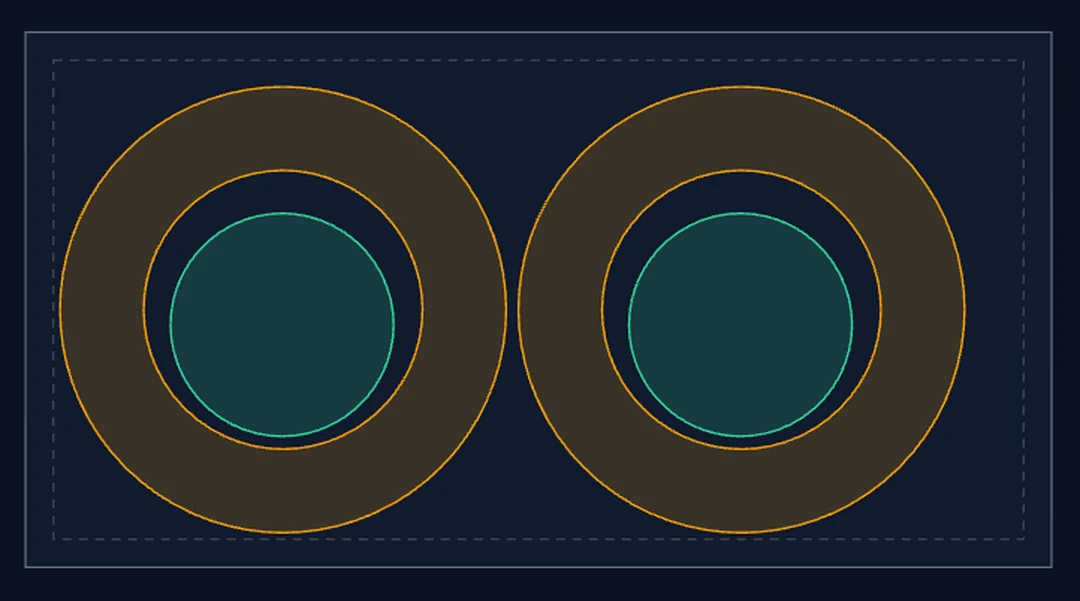
If a part fits inside another part's cutout (a plug inside a ring, small parts inside a frame opening), NestForge places it there, kerf and spacing included. That's material you'd otherwise throw away.
And like every placement, it's proven: the shot on the right is a real nest where the validator confirmed both plugs sit overlap-free inside the rings' bores, with the required clearance measured, not guessed.
Illustrative arithmetic (your numbers will differ): if you cut €150 of material a month and better nesting saves you 6%, that's €9/month (€108 a year) of material you don't buy. NestForge is €39, once.
This is an example calculation, not a measured benchmark. Measured utilization numbers, with seeds so you can re-run them, are in the benchmark section.
Every layout is proven, not eyeballed.
Nesting software has a quiet failure mode: a layout that looks fine but overlaps by a hair, and you find out after the cut, on your material. NestForge treats that as unacceptable and does something unusual about it.
-
The optimizer proposes a layout.
A deterministic placement engine searches thousands of arrangements. Same input, same seed: same result, every time. No randomness you can't reproduce.
-
An independent validator checks it.
A second program, deliberately written to share none of the optimizer's geometry code, re-checks the finished layout from scratch. One program proposes, a different one verifies. The optimizer can't grade its own homework.
-
It computes with exact arithmetic.
Ordinary floating-point math can be off by a hair, exactly the hair that turns “fits” into “scrap”. Where it matters, the validator re-derives distances with exact and extended-precision arithmetic. Its verdict is a fact, not an estimate.
-
Failures come with a witness.
If a check ever fails, the validator doesn't just say “no”; it points at the exact spot: which two parts, the measured gap, the required gap. Nothing to take on faith.
The same validator gates our own test suite and every benchmark number we publish: a layout that fails verification is discarded, never shown, never counted.
Broken files get named errors, not crashes.
Real-world DXF and SVG exports are messy: open contours, duplicate vertices, self-intersections, missing units, files cut off mid-entity. Most nesting tools crash, hang, or silently drop geometry. NestForge's importer is built and fuzz-tested to survive garbage, and to tell you exactly what's wrong and how to fix it in your CAD tool. These are actual error classes from the importer:
→ Close the path in CAD, or raise the auto-close threshold for this import.
→ Run your CAD tool's outline cleanup, then re-export.
→ Export outlines only; see the Fusion 360 / Inkscape / Illustrator / LibreCAD export recipes in the docs.
→ Check the imported part dimensions before nesting.
→ Re-export the file; binary DXF should be re-saved as ASCII DXF (R12/2000).
Small dirt gets repaired automatically: duplicate vertices are welded, tiny gaps (≤ 0.5 mm) are closed with a warning, degenerate slivers are removed. Everything the sanitizer does is reported. Nothing happens silently. And the importer runs against a growing corpus of deliberately broken files, so a malformed export produces a named error, never a freeze.
Arcs stay arcs.
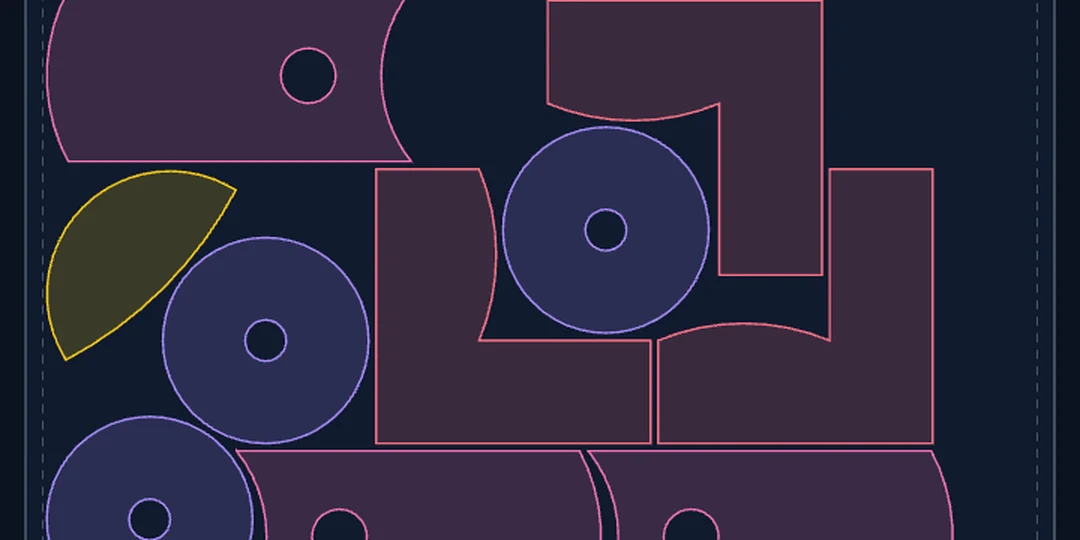
Many nesting tools flatten every curve into dozens of tiny line segments the moment a file is imported, and that polygon soup is what your machine receives: bigger files, jerkier motion, faceted edges on visible parts.
NestForge keeps circles and arcs as true arcs through the whole pipeline: import, kerf compensation, spacing offsets, and export. Your DXF comes out with real ARC entities, your SVG with real arc paths. Round holes are still round when they reach your machine.
Offline and private: by architecture, not by promise.
NestForge is a deterministic geometry engine compiled to WebAssembly. There is no server to send your files to. The entire application runs on your machine, inside your browser.
Your files stay yours
Client parts, prototypes, product designs: nothing is uploaded,
ever. There's no account to create and no cloud to trust. Projects are
saved as plain .nest files on your disk.
Works without internet
Install it as an app (PWA) and nest in the workshop, on a laptop with no signal, or behind a firewall. The license key is verified offline too (cryptographically signed, checked on your machine).
No AI, no black box
No cloud AI, no models, no telemetry. Same parts + same settings + same seed = the same layout, reproducible to the byte. That's a feature, not a limitation.
Numbers you can re-run.
We benchmark on the ESICUP academic instances (the standard test set for irregular nesting) and against current versions of the free tools people actually use. Every published row carries its random seed, so you can reproduce it, and every layout behind a number has passed the independent validator. A layout that fails verification is not counted.
| Instance | Parts | Best length L | Utilization | Effort | Seed | Time | Validator |
|---|---|---|---|---|---|---|---|
| albano | 24 | 10400.4 | 83.70% | standard | 42 | 16.9 s | ✓ passed |
| dagli | 30 | 61.1 | 82.78% | standard | 42 | 23.8 s | ✓ passed |
| dighe1 | 16 | 122.3 | 81.78% | standard | 1337 | 4.9 s | ✓ passed |
| dighe2 | 10 | 111.9 | 89.36% | standard | 1337 | 0.9 s | ✓ passed |
| fu | 12 | 33.0 | 86.35% | standard | 1337 | 1.0 s | ✓ passed |
| jakobs1 | 25 | 13.0 | 75.36% | draft | 42 | 2.3 s | ✓ passed |
| jakobs2 | 25 | 28.0 | 68.91% | standard | 9001 | 6.5 s | ✓ passed |
| shapes0 | 43 | 65.5 | 60.89% | standard | 1337 | 43.6 s | ✓ passed |
| shapes1 | 43 | 62.5 | 63.81% | standard | 42 | 50.6 s | ✓ passed |
| shirts | 99 | 63.7 | 84.75% | standard | 42 | 229.8 s | ✓ passed |
| swim | 48 | 6431.6 | 68.77% | standard | 9001 | 97.0 s | ✓ passed |
| trousers | 64 | 247.9 | 87.84% | standard | 42 | 54.4 s | ✓ passed |
Best validated run per instance: 3 seeds (42, 1337, 9001) × 2 effort levels, 72 runs total, all 72 validator-green. Metric: strip length L at the instance's fixed width, smaller is better; utilization = part area ÷ (width × L). Kerf, spacing and margin are 0 (the semantics used in the nesting literature). Instances: the 12 classic ESICUP datasets (CC0). Measured single-threaded on an Apple-Silicon laptop.
Head-to-head with the free tools
Identical inputs, spacing 0 and identical allowed rotations against SVGnest (live version) and deepnest-next v1.5.6, scripted on the same machine. Both tools are seedless, so each got repeated runs and at least as much wall time per instance as our slowest run there, never under 60 s; their best result counts, and deepnest-next ran with its 4 worker threads while NestForge is single-threaded. On 9 of 12 instances NestForge's best validated run beats both. The honest remainder: SVGnest wins jakobs2 (27.4 vs. our 28.0) and trousers (241.9 vs. our 249.4), jakobs1 is a tie at 13.0, and deepnest-next trailed on all twelve.
Re-checked with the same validator
We ran every competitor layout through the same independent validator that gates our own numbers. Of 24 SVGnest runs, 2 passed the exact violation-free check; of 24 deepnest-next runs, 0. Ours: 72 of 72. The violations are tiny (1e-6 to 1e-5 instance units, floating-point rounding) and often harmless in practice, so those results still count fully in the comparison above. What they show is a difference in guarantee: our layouts are machine-proven, theirs are not.
Robustness, same discipline
All 53 deliberately malformed files in our test corpus end in a named error or an import with explicit warnings; 0 crashes. On the same dirty subset, the other tools often throw unhandled exceptions or import nothing without a message; deepnest-next converts DXF through an online service by design, so its DXF import needs a network connection. NestForge imports everything locally, offline.
Every row above carries its seed, and effort levels are fixed iteration budgets: same input, same seed, same layout. Published academic best values are a different game (hours-long runs with exact NFP databases); we compare runnable free tools under identical, documented conditions, and the methodology, including its limits, is written down with the numbers. We don't publish results we can't prove.
One price. Pay once.
No subscription, no account, no per-seat cloud plan. Try the free tier on your own files first. If your DXF imports and nests there, it will after purchase too.
Free tier
€0
No time limit. No signup.
- Up to 10 parts per job, 1 sheet
- Full import pipeline: test your DXF/SVG files
- Full nesting engine & validation
- DXF / SVG / PDF export
- Runs offline, files stay local
NestForge Full
€29 €39
One-time purchase · offline license key · all v1 updates included · plus VAT/sales tax depending on your country (final amount at checkout)
- Unlimited parts and sheets
- Multi-sheet jobs with per-sheet report
- Rotation / mirror / grain constraints
- License key works offline, on all your machines
- 14-day money-back guarantee, no questions asked
Questions, answered honestly.
The same answers we give in support mail, no marketing dialect.
Which file formats can I import and export?
Import: SVG (paths, rects, circles, ellipses, polygons, groups with transforms) and DXF R12/2000/2007 text format: LWPOLYLINE with arcs, LINE, ARC, CIRCLE, ELLIPSE, SPLINE, POLYLINE, and INSERT/blocks including nested and mirrored ones. Export: nested DXF (per sheet), SVG (per sheet + overview), and printable PDF cut sheets. Projects are saved as .nest files.
How do I find the right kerf for my machine and material?
Measure it. It's a 5-minute test and it's how the pros do it, because kerf depends on your machine, lens/nozzle, power, speed and the exact material batch:
- Cut a small rectangle, e.g. nominal 20 × 20 mm.
- Measure the cut-out piece with calipers, e.g. 19.82 mm.
- Kerf = nominal − measured = 0.18 mm. Enter that in NestForge.
NestForge applies kerf plus your minimum spacing between all parts and to the sheet margin, and the validator proves the distances were respected.
Does it really work offline?
Yes. After the first load you can install it as an app (your browser will offer this) and use it with no internet connection at all. Nesting, import, export and license verification all run locally. There is no server component: not for computing, not for licensing, not for anything.
Where do my files go? Do you see my designs?
Nowhere, and no. Files are opened in your browser's memory and never transmitted; there's no upload endpoint in the product. We run no analytics and no telemetry. If you email us a diagnostic bundle for a broken file, it contains anonymized structure statistics (entity counts, error codes), not your geometry or names.
Which browsers are supported?
Current Chrome, Edge, Firefox and Safari on desktop (Windows, macOS, Linux). NestForge is WebAssembly, which all of these support. One honest note for Safari/iPad users: browsers may evict site storage after periods of disuse, which is why NestForge saves projects as real files on your disk instead of trusting browser storage. Your work and license key survive regardless.
Will the exported files work with LightBurn, Glowforge, xTool XCS or my plasma CAM?
NestForge exports standard DXF and SVG, which is what these tools consume, and offers two DXF flavors (modern LWPOLYLINE and a strict R12 POLYLINE mode for picky older software). The honest answer beyond that: workflows differ, which is exactly why the free tier has no time limit. Run your real files through your real toolchain before you pay. If your toolchain rejects an export, tell us; if we can't fix it, you get your money back.
My DXF is rejected by other tools or crashes them. What will NestForge do with it?
Try it. That's what the free tier is for. The importer is fuzz-tested against a corpus of deliberately broken files. Small defects (duplicate vertices, micro-gaps up to 0.5 mm, degenerate slivers) are repaired automatically and reported. Real defects (open contours, self-intersections, unsupported entities, missing units, truncated files) produce a named error that tells you what's wrong, where, and how to fix it in your CAD program, including step-by-step export recipes for Fusion 360, Inkscape, Illustrator and LibreCAD.
How is NestForge different from Deepnest or deepnest-next?
Deepnest is a well-known free nesting tool, and deepnest-next is an actively maintained fork; if it works for your files, it's a fine choice and it costs nothing. NestForge differs in the things we built it for: arcs are preserved end to end instead of being flattened to polygons on export, malformed files produce named errors with fix hints instead of failing opaquely, every layout is verified by an independent exact-arithmetic validator, and it runs in the browser with no installation, fully offline, with no account. It costs €39 once; the free tier exists precisely so you can compare both on your own files and keep whichever serves you better.
Is this a subscription? What about updates?
No subscription. €39 (€29 intro) buys a perpetual license for NestForge v1, including all v1.x updates. If there is ever a paid v2, your v1 keeps working. A one-time purchase means the version you bought doesn't expire. Prices are plus VAT/sales tax depending on your country; the payment processor shows the final amount at checkout.
What exactly are the free tier limits?
10 parts per job (counting quantities) and 1 sheet. Everything else is identical to the paid version: same importer, same nesting engine, same validation, same exports, same offline behavior. It doesn't expire. The point is that you can verify NestForge works with your files and your machine before buying.
What's the refund policy?
14 days, no questions asked, whether you're an EU consumer or not. Nesting results depend on your specific parts, and we'd rather refund than argue. See the refund & withdrawal policy.
On how many machines can I use my license?
On all machines you personally use. The key is bound to your email address, not to hardware, and is verified offline. Workshop PC, laptop, home machine: one license. Re-entering it is a single paste.
Can parts be placed inside holes of other parts?
Yes. If a part fits into another part's cutout (a disc inside a ring, small parts inside a frame opening), the optimizer can place it there, with kerf and your minimum spacing applied inside the hole too, and the validator proves the placement overlap-free like any other. Concave bays and notches work as well.
Can it respect grain direction on wood or patterned material?
Yes. Mark a part as grain-sensitive and give the sheet a grain axis (0° or 90°); the optimizer will only place that part in the allowed orientation, and the validator independently confirms the constraint was honored. It's one of the four proven checks, not a soft preference.
Is there AI involved?
No. NestForge is a deterministic computational-geometry engine: no cloud AI, no models, no training on your data, no account. Given the same parts, settings and seed, it produces the identical layout every time. In a workshop tool, we consider reproducibility a feature.
What does “machine-verified” actually mean?
After nesting, a second, independent program re-checks the layout from scratch with exact arithmetic: no two parts overlap, everything lies inside the sheet margins, kerf plus your minimum spacing is respected between all parts, and grain constraints hold. It shares no geometry code with the optimizer, so it can't inherit its bugs. Details in the proof section.